

カスタムCSSに以下のコードを追加
メインビジュアルは高さ指定がよい
/* ヘッダーをメインビジュアルの上に重ねる */
.l-header {
position: absolute;
top: 0;
left: 0;
width: 100%;
z-index: 1000; /* 手前に出す */
background: transparent;
}
/* スクロール後に背景色を付けたい場合の例(必要なら) */
body.is-scrolled .l-header {
position: fixed;
background: rgba(255, 255, 255, 0.9);
backdrop-filter: blur(8px);
}
/* PCで表示*/
@media (min-width: 960px){
.l-header__barInner{
display:flex;
justify-content: space-between;
}
.l-header__bar .l-container{
margin-right: 0;
margin-left: 0;
max-width: 100%;
}
/* ロゴ*/
.c-headLogo{
align-items: center;
}
.contact-box {
margin-left: auto;
margin-bottom: 2px;
line-height: 1.5em;
}
.contact-box span {
display: block;
}
.contact-box01{
font-size: 11px;
text-align: justify;
text-align-last: justify;
}
.contact-box02 {
font-weight: 700;
font-size: 25px;
letter-spacing: 2px;
margin-bottom: 2px;
}
.contact-box03 {
font-size: 11px;
text-align: justify;
text-align-last: justify;
}
.contact-banner {
padding-left: 1em;
}
.contact-banner .far{
padding-right:5px;
}
.contact-banner .fas{
padding-right:5px;
}
.contact-banner a {
font-size: 16px;
height: 88%;
display: flex;
align-items: center;
padding: 0 2em;
margin-top:3px;
}
.kanta-cta {
border:1px solid #fff;
color: #fff;
}
.kanta-cta:hover{
background:#999;
color:#fff;
}
.-parallel .l-header__logo {
display:flex;
padding:16px 48px;
}
.l-header__inner .c-headLogo {
width: 30%;
display:block !important;
text-align:left;
}
.kanta-right {
width: 69.9%;
display:flex;
margin-left:auto;
}
.l-fixHeader__inner l-container .c-headLogo{
width:100%;
}
}
@media (max-width: 1100px){
.conta{
display:none;
}
}
/* スマホで非表示*/
@media (max-width: 959px){
.kanta-right{
display:none;
}
}
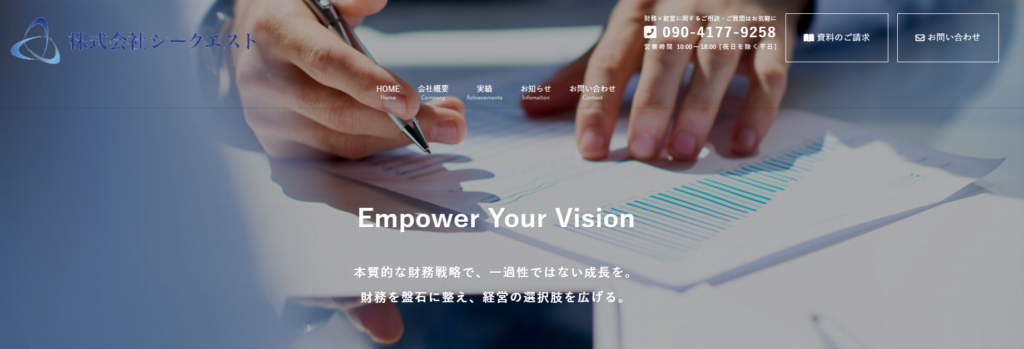
- TOPページの右に問い合わせボックス表示(2つ)
- 営業時間や電話番号など表示
- TOPページは文字の色が白
- ボックスも白
- メインビジュアルを背景透過
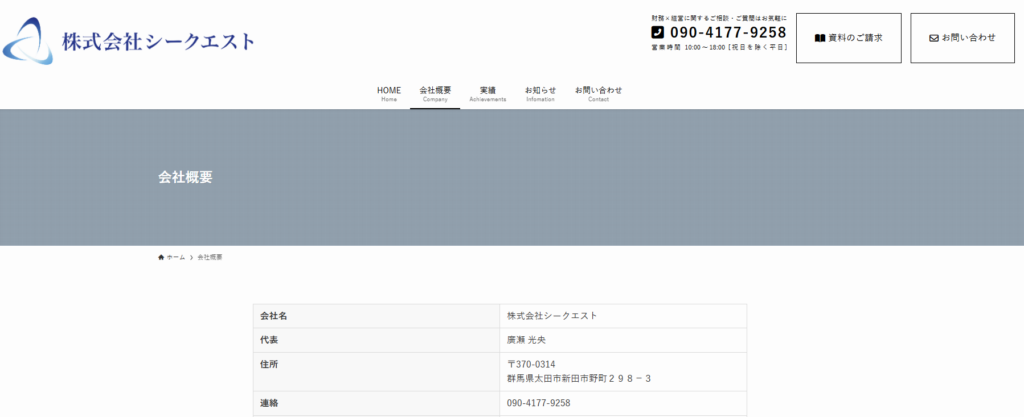
- 固定ページなどは文字が黒
- メニューなども黒(SWELLのヘッダー文字色を黒にしているから)
- 背景透過しない
/* PCで表示*/
@media (min-width: 960px){
.l-header__barInner{
display:flex;
justify-content: space-between;
}
.l-header__bar .l-container{
margin-right: 0;
margin-left: 0;
max-width: 100%;
}
/* ロゴ*/
.c-headLogo{
align-items: center;
}
.contact-box {
margin-left: auto;
margin-bottom: 2px;
line-height: 1.5em;
}
.contact-box span {
display: block;
}
.contact-box01{
font-size: 11px;
text-align: justify;
text-align-last: justify;
}
.contact-box02 {
font-weight: 700;
font-size: 25px;
letter-spacing: 2px;
margin-bottom: 2px;
}
.contact-box03 {
font-size: 11px;
text-align: justify;
text-align-last: justify;
}
.contact-banner {
padding-left: 1em;
}
.contact-banner .far{
padding-right:5px;
}
.contact-banner .fas{
padding-right:5px;
}
.contact-banner a {
font-size: 16px;
height: 88%;
display: flex;
align-items: center;
padding: 0 2em;
margin-top:3px;
}
.kanta-cta {
border:1px solid #fff;
color: #fff;
}
.kanta-cta:hover{
background:#999;
color:#fff;
}
.-parallel .l-header__logo {
display:flex;
padding:16px 48px;
}
.l-header__inner .c-headLogo {
width: 30%;
display:block !important;
text-align:left;
}
.kanta-right {
width: 69.9%;
display:flex;
margin-left:auto;
}
.l-fixHeader__inner l-container .c-headLogo{
width:100%;
}
}
@media (max-width: 1100px){
.conta{
display:none;
}
}
/* スマホで非表示*/
@media (max-width: 959px){
.kanta-right{
display:none;
}
}
/* ▼ TOPページだけ白いボックスにする ▼ */
.home .kanta-cta {
border: 1px solid #fff;
color: #fff;
}
/* ▼ TOP以外(固定ページ・投稿ページ)は黒いボックスにする ▼ */
.kanta-cta {
border: 1px solid #000;
color: #000;
}
/* ▼ TOPページ(フロントページ)だけでヘッダーを重ねる ▼ */
.home .l-header {
position: absolute;
top: 0;
left: 0;
width: 100%;
z-index: 1000;
background: transparent;
}
/* ▼ スクロール後の背景色(必要なら) ▼ */
.home.is-scrolled .l-header {
position: fixed;
background: rgba(255, 255, 255, 0.9);
backdrop-filter: blur(8px);
}
/* ▼ TOPページだけ白いcontact-boxにする ▼ */
.home .contact-box {
color: #fff;
border-color: #000; /* 必要なら */
}
/* ▼ TOPページだけグローバルナビを白にする ▼ */
.home .c-gnav a {
color: #fff;
}
/* ▼ 必要ならホバー色も白系に調整 */
.home .c-gnav a:hover {
color: #f0f0f0;
}
- TOPページのみ サブメニューの背景色と文字色を変更
/* トップページのみ:サブメニュー(ul.sub-menu)の背景色と文字色 */
.home ul.sub-menu {
background-color: #e5e5e5 !important; /* グレー */
}
/* サブメニュー内のリンク文字色 */
.home ul.sub-menu li a {
color: #000000 !important; /* 黒 */
}
/* マウスを乗せた時の色(お好みで調整してください) */
.home ul.sub-menu li a:hover {
background-color: #e5e5e5 !important; /* ホバー時の背景 */
color: #ffffff !important; /* ホバー時の文字色 */
}